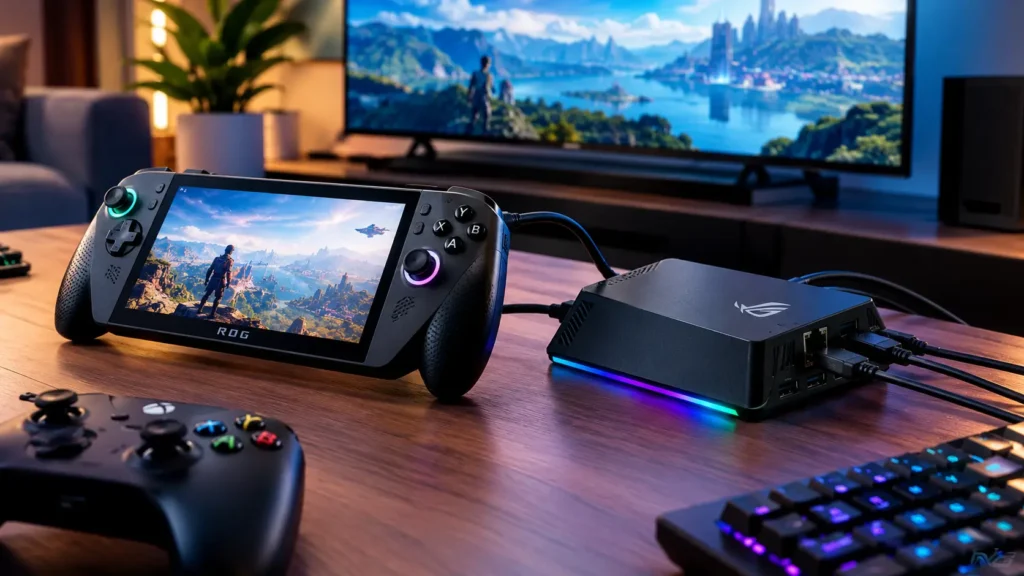
ROG Xbox Ally X ($999.99) turns into a living-room PC the moment it meets the right dock. The wrong one leaves you with a 4K60 ceiling, a draining battery, or both.
The best dock for the ROG Xbox Ally X pairs HDMI 2.1 with at least 100W of USB-C Power Delivery input. Below are the picks by budget, plus a straight answer on whether your Steam Deck dock is good enough.
Some links on this page are affiliate links. If you buy through them, Rallynomics receives a commission at no extra cost to you.
Key Takeaways
- ROG Bulwark Dock DG300 is the best TV dock: HDMI 2.1 up to 4K at 144Hz, VRR, and 100W PD for $119.99, as long as you supply a 100W charger.
- Under $50, UGREEN and JSAUX cover 4K120: Both offer HDMI 2.1, Gigabit Ethernet, and 100W PD input for roughly $32 to $46.
- The Steam Deck dock works, but its 45W charger is the bottleneck: Swap in a 100W USB-C PD charger or expect the battery to drain in Turbo mode.
What a Dock Must Handle for the Ally X
The Ally X has two USB-C ports, and both carry video and power. Either one can feed a dock, so port choice matters less than the dock itself.
- USB4 port: Thunderbolt 4 compliant, 40Gbps, DisplayPort 1.4 with FreeSync, Power Delivery 3.0.
- USB 3.2 Gen 2 port: 10Gbps, DisplayPort output, Power Delivery.
- In the box: a 65W USB-C charger (20V at 3.25A).
- Internal display: 7-inch 1080p at 120Hz, so 1080p120 is the native target.
If you plan to add an external GPU later, keep the USB4 port free and dock through the other one. Our breakdown of USB4 and Thunderbolt 5 explains why the bandwidth gap matters for eGPUs but not for a TV dock.
Three Specs That Separate Good Docks From Bad Ones
- HDMI version: HDMI 2.0 tops out at 4K60 or 1440p120. HDMI 2.1 unlocks 4K120 and VRR.
- PD input rating: Look for 100W input. Every dock keeps part of the incoming power for itself.
- Cable reach: The dock’s USB-C lead must reach the port you use without bending the handheld.
Best Overall Dock for TV Play
The ROG Bulwark Dock (2025) DG300 is the most complete dock for the Ally X in the US right now. It is first-party, so it matches the handheld’s port layout, and it is the only pick here with 10Gbps USB.
| Spec | ROG Bulwark Dock DG300 |
|---|---|
| Price | $119.99 (ASUS Store, list $139.99) |
| Video | HDMI 2.1, up to 4K144 or 8K30 |
| Display features | VRR |
| Power | Up to 100W USB-C PD |
| USB | 3x USB-A, USB-C data at 10Gbps |
| Network | Gigabit Ethernet |
| Extras | Audio jack, 90-degree USB-C cable |
The Catch: Bring Your Own 100W Charger
ASUS recommends a 100W USB-C adapter for the DG300, and the 65W unit in the Ally X box falls short of that. Budget roughly $40 to $60 for a quality 100W GaN charger.
You also need an Ultra High Speed HDMI cable (48Gbps). An older High Speed cable will quietly cap you at 4K60.
ASUS has also shown a slimmer DG310 variant with HDMI 2.1 and up to 80W of passthrough. It has no announced US price yet.
The Single-Box Alternative
The ROG 100W Gaming Charger Dock ($99.99) builds a 100W GaN charger into the dock itself. Trade-off is HDMI 2.0, so it maxes out at 4K60 or 1080p120.
It suits travel and hotel TVs, where one brick beats a dock plus a charger.
Best Budget Dock Under $50
Three third-party docks deliver HDMI 2.1 and 100W PD input for under $50. All of them list the Ally X family as compatible.
| Dock | Price | HDMI | PD input | USB data | Ethernet |
|---|---|---|---|---|---|
| UGREEN 6-in-1 Steam Deck Dock | $45.99 (often $32) | 2.1, 4K120, VRR | 100W (85W to host) | 2x USB-A, 1x USB-C, 5Gbps | Gigabit |
| JSAUX 6-in-1 for ROG Xbox Ally (HB0612) | $39.99 | 2.1, 4K120 HDR | 100W | 3x USB-A, 5Gbps | Gigabit |
| JSAUX 6-in-1 Multifunctional (HB0609) | $45.99 | 2.1, 4K120 | 100W | 2x USB-A, 1x USB-C, 5Gbps | Gigabit |
| ROG Gaming Charger Dock (65W) | $44.99 (list $64.99) | 2.0, 4K60 | Built-in 65W | 1x USB-A 2.0 | None |
Which Budget Dock to Pick
- UGREEN 6-in-1: The best value when it drops near $32, and the only budget pick that states its host passthrough figure (85W).
- JSAUX HB0612: Built around the Xbox Ally chassis, with three USB-A ports for a controller, keyboard, and mouse.
- JSAUX HB0609: Adds a downstream USB-C data port and lists 1080p at 240Hz for high-refresh monitors.
- ROG Gaming Charger Dock: Pick it only if you want the charger built in and can live with 4K60.
None of the three HDMI 2.1 docks ships with a charger. Plan on a 100W PD unit to avoid the power issues covered below.
Will Your Steam Deck Dock Work
Yes. Valve’s Steam Deck Docking Station ($79) uses standard USB-C DisplayPort Alt Mode, so the Ally X outputs video, Ethernet, and USB through it without drivers.
| Spec | Steam Deck Docking Station |
|---|---|
| Price | $79 |
| HDMI | 2.0 (4K60 or 1440p120) |
| DisplayPort | 1.4 |
| USB | 3x USB-A 3.1 Gen 1 |
| Network | Gigabit Ethernet |
| Included charger | 45W USB-C PD |
The 45W Problem
The included 45W charger was sized for the Steam Deck, not a 35W APU at its Turbo limit. In Turbo mode, the Ally X can draw more than that charger delivers once the dock takes its share.
The fix is simple: plug a 65W or, better, a 100W USB-C PD charger into the dock instead. Valve does not publish a passthrough rating above 45W, and Rallynomics has not yet bench-tested the dock with the Ally X, so treat sustained Turbo charging through it as unverified.
Use the DisplayPort Output for 120Hz
On a monitor, the dock’s DisplayPort 1.4 output is the better path to high refresh rates. Over HDMI 2.0, you are limited to 4K60 or 1440p120 on a TV.
If you own a Steam Deck and an Ally X, one dock with a 100W charger serves both.
Docks That Work Across Every Handheld
If your household mixes handhelds, a universal USB-C dock avoids buying one per device. Every dock in this guide uses standard USB-C Alt Mode, so cross-compatibility is broad.
| Dock | ROG Xbox Ally X | Steam Deck | Legion Go 2 | MSI Claw |
|---|---|---|---|---|
| ROG Bulwark DG300 | Listed | Unlisted | Unlisted | Unlisted |
| UGREEN 6-in-1 | Listed | Listed | Unlisted | Listed |
| JSAUX HB0612 | Listed | Listed | Listed | Listed |
| Steam Deck Docking Station | Unlisted | Listed | Unlisted | Unlisted |
| Lenovo Legion Go USB-C Dock | Unlisted | Unlisted | Listed | Unlisted |
“Unlisted” means the manufacturer does not name the device, not that it fails. Video and data run over standard USB-C, while charging speed depends on the charger behind the dock.
Nintendo Switch 2 is the real exception: it is not compatible with the UGREEN or JSAUX docks.
The Legion Go 2 Dock Question
Lenovo sells its Legion Go USB-C Dock ($64.99 list) for both Legion Go generations. It offers HDMI 2.0 at 4K60, 100W PD input, two USB-A 3.0 ports, one USB-C port, and Ethernet.
It works with the Ally X, but at its price, HDMI 2.1 docks from UGREEN and JSAUX offer more display headroom. For a full view of the hardware these docks serve, see our guide to the best handheld gaming consoles of 2026.
Why Some Docks Will Not Charge While Gaming
Docks do not create power. They split whatever the charger supplies between their own electronics, attached peripherals, and the handheld.
How the Power Budget Breaks Down
- The charger: The Ally X ships with 65W. A 100W unit is the practical target for docked play.
- The dock’s overhead: UGREEN’s dock forwards 85W from a 100W input, keeping 15W for itself and its ports.
- The handheld’s draw: Turbo mode sustains 35W at the APU, with short boosts up to 55W, before counting the rest of the system.
- Peripherals: Controllers, drives, and RGB accessories on the USB ports take from the same pool.
Run a 65W charger through a dock with similar overhead and roughly 50W reaches the Ally X. Under a heavy Turbo load, that can stall charging or slowly drain the 80Wh battery.
Signs Your Setup Is Underpowered
- The battery percentage drops while docked and gaming.
- Charging pauses when you connect a display.
- The dock resets or the display blinks under load.
How to Fix It
- Replace the charger with a 100W USB-C PD model.
- Move high-draw accessories to a separately powered hub.
- Use Performance mode instead of Turbo for lighter games.
FAQ
Yes. Video, USB, and Ethernet all work over standard USB-C. The limitation is the bundled 45W charger, which cannot sustain Turbo mode, so replace it with a 100W USB-C PD charger.
For docked gaming in Turbo mode, yes. The included 65W charger loses part of its output to the dock’s overhead, which can leave the Ally X draining its battery under load. A 100W charger gives you headroom for both the handheld and the dock.
Yes, with an HDMI 2.1 dock, an Ultra High Speed HDMI cable, and an HDMI 2.1 port on the TV. Docks that also run USB 3 data rely on DSC compression to fit 4K120 over DisplayPort 1.4. In practice, most demanding games run at 1080p or 1440p and upscale to 4K.
A USB-C hub with HDMI and PD passthrough works electrically, since it is the same technology. Most hubs, however, cap HDMI at 4K60 and lack a stand. Our roundup of laptop docks covers models that can double as a travel option.